Historized links, pt. 1 (M:N case)
A common problem in business-oriented database design is how to store the history of data as it changes. Tracking the changes of attribute values is needed more often, and is widely explained, see for example my previous post “Historized attributes: systematic table design”.
In this post we’ll discuss a slightly more complex scenario: historized relationships. First we discuss the M:N case. 1:N is very similar logically, but requires a somewhat different physical approach.
Table of contents
See also: Historized links: introduction.
“Database Design Book” (2025)
Learn how to get from business requirements to a database schema
If this post was useful, you may find this book useful too.
Table of contents and sample chapters
Book length: 145 pages, ~32.000 words. Available in both PDF and in EPUB format.
Project tracking system (M:N case)
Imagine a simple work tracking system. It uses two main entities: Workers and Projects. A worker can be assigned to a certain project for a certain amount of time.
Note that she could be assigned to the same project several times in non-overlapping periods of time. Examples:
- “Alice was assigned to project Foo from 2026-03-02 till 2026-03-13” (historical assignment);
- “Alice is assigned to project Foo from 2026-05-18” (current assignment).
Multiple workers can be assigned to a certain project, and a worker can have multiple projects assigned. (This is commonly known as M:N relationship).
This is the simplest example that demonstrates the general concept. You can apply it to any other relationship, just by changing the names.
Queries, logically
When you are busy with the logical design of the primary data, you usually don’t need to think too much about the specific queries that the system would be making. Queries are more relevant when you:
- think about the physical design of the primary data;
- build secondary data representations (also physical, by definition).
In this scenario, though, it makes sense to think a bit more about the future queries. We want to use the following information:
- What is the current state? What is the list of projects that the worker is assigned to today? What is the list of workers assigned to the project today?
- What was the state at a certain date? What was the list of projects that the worker was assigned to at a certain date in the past? Same for the list of workers of a project.
- What is the history of the relationship between worker and project? When was she assigned to the project, including the current assignment, if it’s still on.
Handling dates and times in the future
When you think about the problem that we’re having, you may want to jump to handling the information about the future, also.
What if we want to assign a worker to a project starting today for two weeks (finish date in the future)? It’s a very natural business requirement. What if we want to schedule a worker for a project starting in a week for three weeks (both dates in the future)?
It’s certainly possible to design a database schema for this, if this is what you want. However, we won’t discuss future dates in this post: only the past history and the current state. Why?
Because dealing with future plans in the database is a bit more complicated, because you need to separate two things: what was supposed to happen and what actually happened. Implementing this could be a good exercise for the interested reader.
Non-historized variant
Let’s start with the non-historized variant: just keep track of the current project/worker assignment. Using the tabular notation from “Database Design Book” we have the following anchors:
| Anchor | ID example | Physical table |
|---|---|---|
| Project | 1, 2, 3, … | projects |
| Worker | 1, 2, 3, … | workers |
And a link:
| Anchor1 : Anchor2 | Sentences | Cardi- nality |
Physical table or column |
|---|---|---|---|
| Project : Worker | A Project can be assigned to several Workers A Worker can be assigned to several Projects |
M : N | project_workers |
We omit the attributes here, such as Project title and Worker name, because they add nothing to the conversation.
Using the baseline table design strategy, we get a simple schema:
CREATE TABLE projects (
  id INTEGER NOT NULL AUTO_INCREMENT PRIMARY KEY
  -- . . .
);

CREATE TABLE workers (
  id INTEGER NOT NULL AUTO_INCREMENT PRIMARY KEY
  -- . . .
);

CREATE TABLE project_workers (
  project_id INTEGER NOT NULL,
  worker_id INTEGER NOT NULL,
  PRIMARY KEY (project_id, worker_id),
  KEY (worker_id)
);
Full logical model
There are two possible approaches to designing the historized relationships. The first approach, that we will use, is to keep the current state and historical information as separate data elements. Another approach is to treat the current state the same way as historical information; we’ll discuss it later in a separate chapter.
So, first part: current state. Where do we store the information about current project/worker assignments? This looks very similar to the non-historized variant:
Anchors:
| Anchor | ID example |
|---|---|
| Project | 1, 2, 3, … |
| Worker | 1, 2, 3, … |
And a link:
| Anchor1 : Anchor2 | Sentences | Cardi- nality |
|---|---|---|
| Project : Worker | A Project can be assigned to several Workers A Worker can be assigned to several Projects |
M : N |
But we also need to keep track of the start date of this assignment. This is where a link attribute comes in handy:
| Anchor / Link | Question | Data type | Example value |
|---|---|---|---|
| Project / assigned / Worker | When was this Project assigned to this Worker? | date | 2026-02-12 |
Second part: historical information about previous assignments.
Business requirements state that the same person could be assigned to a project multiple times. That means that we have another anchor here:
| Anchor | ID example |
|---|---|
| Assignment | 1, 2, 3, … |
Simple links between the three anchors:
| Anchor1 : Anchor2 | Sentences | Cardi- nality |
|---|---|---|
| Assignment : Worker | An Assignment refers to only one Worker A Worker can have several Assignments |
1 : N |
| Assignment : Project | An Assignment refers to only one Project A Project can have several Assignments |
1 : N |
Finally, let’s add some attributes:
| Anchor / Link | Question | Data type | Example value |
|---|---|---|---|
| Assignment | When did this Assignment begin? | date | 2026-03-02 |
| Assignment | When did this Assignment end? (inclusive) | date | 2026-03-13 |
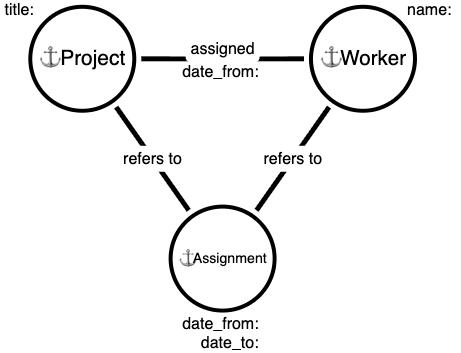
Here is a small diagram that shows how anchors and links are related, including attributes.
Physical schema
So far we’ve been only discussing the logical schema. Here is what we’re going to do next:
- assemble all the logical pieces from the previous chapter;
- choose sensible names and types for tables and columns, using the textbook table design strategy;
- write down CREATE TABLE statements, based on that information;
Building a physical schema is usually straightforward. In this case, though, we’ll discuss it in a bit more depth, because this is a particularly important pattern.
Anchors:
| Anchor | ID example | Physical table |
|---|---|---|
| Project | 1, 2, 3, … | projects |
| Worker | 1, 2, 3, … | workers |
| Assignment | 1, 2, 3, … | assignments |
Links:
| Anchor1 : Anchor2 | Sentences | Cardi- nality |
Physical storage |
|---|---|---|---|
| Project : Worker | A Project can be assigned to several Workers A Worker can be assigned to several Projects |
M : N | project_workers |
| Assignment : Worker | An Assignment refers to only one Worker A Worker can have several Assignments |
1 : N | assignments.worker_id |
| Assignment : Project | An Assignment refers to only one Project A Project can have several Assignments |
1 : N | assignments.project_id |
Attributes:
| Anchor / Link | Question | Data type | Example value | Physical type |
Physical storage |
|---|---|---|---|---|---|
| Project / assigned / Worker | When was this Project assigned to this Worker? | date | 2026-02-12 | DATE NOT NULL | project_workers.assigned_from |
| Assignment | When did this Assignment begin? | date | 2026-03-02 | DATE NOT NULL | assignments.assigned_from |
| Assignment | When did this Assignment end? (inclusive) | date | 2026-03-13 | DATE NOT NULL | assignments.assigned_till |
Now we can do another straightforward process, and write down the CREATE TABLE statements, based on the information above.
CREATE TABLE projects (
  id INTEGER NOT NULL AUTO_INCREMENT PRIMARY KEY
  -- . . .
);

CREATE TABLE workers (
  id INTEGER NOT NULL AUTO_INCREMENT PRIMARY KEY
  -- . . .
);

CREATE TABLE project_workers (
  project_id INTEGER NOT NULL,
  worker_id INTEGER NOT NULL,
  assigned_from DATE NOT NULL,
  PRIMARY KEY (project_id, worker_id),
  KEY (worker_id)
);

CREATE TABLE assignments (
  id INTEGER NOT NULL AUTO_INCREMENT PRIMARY KEY,
  project_id INTEGER NOT NULL,
  worker_id INTEGER NOT NULL,
  assigned_from DATE NOT NULL,
  assigned_till DATE NOT NULL,
  KEY (project_id, worker_id),
  KEY (worker_id)
);
The physical schema follows mechanically from the logical elements, using the baseline table design strategy:
- a table per anchor;
- a table per each M:N link;
- a column per attribute;
- a column per 1:N link.
Data validation
Correctness and validity of data is one of the concerns in database design. Classic relational databases support two broad types of table constraints: basic and structural.
Basic table constraints are:
- nullability and uniqueness provided by primary keys (e.g., only one User can have ID=20);
- referential integrity via enforced foreign keys (e.g., if a project is assigned to User ID=30 then this user must exist, if a user ID is invalid then you cannot assign it to a project);
- uniqueness of attribute values (e.g., User nicknames are unique);
- validation of attribute values, provided by CHECK constraints and NOT NULL constraints (e.g., a project name must be specified and be non-empty);
All those constraints are generally very well supported across the board. There are some interesting details around each of those topics, but this is out of scope for this text.
Unfortunately, as you go beyond basic table constraints, things go downhill pretty quickly. Many, if not most, interesting structural validations are hard or impossible to implement directly in table schema.
For example, one of the things that we may like to validate is the following: project assignment periods for each worker should not overlap. Note that this must include records in both tables: project_workers and assignments.
In practice people implement data validation in the application. The system must make sure that it only writes correct data into the database. Often it must also be prepared to handle incorrect or ambiguous data that inevitably arises during years-long development and maintenance cycles.
Unfortunately, many database design tutorials and such continue to insist that relational databases are capable of arbitrary data validity rules, which is simply not true. There are maybe a dozen of relational design tricks that you could use, but they would only work if you’re lucky and your problem matches a certain pattern.
Our problem (non-overlapping time periods) generally requires application-level validation. In newer versions of some database engines this validation may be implemented directly: see “exclusion constraints” in PostgreSQL, “SQL assertions” in Oracle 26i, and “WITHOUT OVERLAPS” keyword in MariaDB.
As usual, we can only discuss the lowest common denominator. You should be learning the capabilities of your database server for more interesting functionality.
Queries, physically
We need to be able to answer two basic queries:
- what is the current state;
- what was the state at any given time;
We also need to discuss how to move the data from “currently assigned” to “was assigned historically”.
Current state query
We assume that the first question is more important: that is, the query needs to be more performant and easier to query.
Technically, we could have said that “current state” is just “the state at a given time: today”, but it would prevent optimizations.
For example, here is the list of workers currently assigned to a project:
SELECT project_id, worker_id, assigned_from
FROM project_workers
WHERE project_id = :project_id
This query is absolutely minimal. It relies on the guarantee that
“project_workers” contains the current state. Because of that we
don’t even need to consider the “assigned_from” column for filtering.
We have both a primary key and an index on the second column, so the
query would be executed perfectly. Also, this query does not touch
the “assignments” table.
State at a given time query
Here we need to consult both tables. We can combine results by UNION ALL or just by doing two queries and concatenating them in our code.
SELECT project_id, worker_id, assigned_from, NULL AS assigned_till
FROM project_workers
WHERE project_id = :project_id
AND assigned_from <= :as_of_date

UNION ALL

SELECT project_id, worker_id, assigned_from, assigned_till
FROM assignments
WHERE project_id = :project_id
AND assigned_from <= :as_of_date AND :as_of_date <= assigned_till
First, here “:as_of_date” is a query placeholder that contains the date that we’re interested in.
Second, note that “assigned_till” contains the date inclusive. Because of that we use the “<=” operator.
For some other historized attributes it makes sense to use exclusive end values, especially for timestamps. We’ll discuss it later.
Third, this query relies on the guarantee that the information in both tables is non-overlapping. That is, each worker assignment is either in “project_workers” or in “assignments”. If this guarantee is violated, you may get incorrect results.
Particularly, we can use “UNION ALL” here, because it just
mechanically concatenates two results, and not the “UNION” that does
the deduplication, which we do not need.
One possible solution for that is to try and introduce database constraints, but we’ll see that this may be quite hard for several reasons. Let’s investigate this later.
Fourth, as already discussed, you can break the query in two at “UNION ALL”, and submit both queries one after another, or even in parallel.
Finishing current assignment query
One other query that we need to discuss is how to move from “currently assigned” to “was assigned historically”.
Suppose that we have the following row in “project_workers”:
project_id=100; worker_id=35; assigned_from=2026-05-01
Suppose that today, 2026-06-07, is the last day of this assignment. At the end of the day we need to do the following two queries:
BEGIN TRANSACTION;

DELETE FROM project_workers
WHERE project_id = 100 AND worker_id = 35;

INSERT INTO assignments (project_id, worker_id,
                         assigned_from, assigned_till)
VALUES (100, 35, '2026-05-01', '2026-06-07');

COMMIT TRANSACTION;
Why do we delete first and then insert? That’s a nod towards database integrity constraints: if you insert first, you will have an interim overlap of ranges.
There could be variations of that query, but they must preserve the guarantee that the data is not overlapping.
What’s next
We’ve discussed roughly half of the broad design space of historized relationships. In the follow-up post we’ll focus on 1:N links.
Subscribe here to receive updates.